
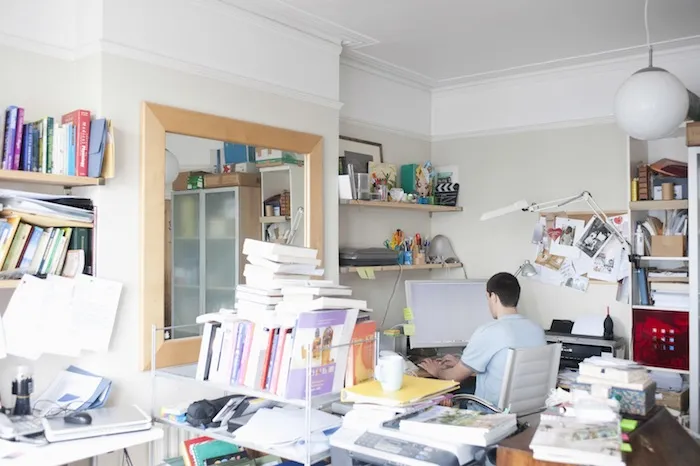
The majority of corporate headquarters isn’t purposely filled with clutter. It was a reorg here, a merger there, and a “we’ll figure it out when we have the time” everywhere until facilities managers were left with a building full of furniture that no one seems to have any record of purchasing. The solution doesn’t involve ‘tidying up’ workstations – it’s a phased operational project that begins with an audit. . . and has no end – it’s maintenance.
Why headquarters accumulate so much stuff in the first place
At any enterprise company, the total inventory of furniture is a shocking number. Try to run it down, though, and you’re greeted with an array of incomplete spreadsheets, post-it notes, and often the vociferous insistence that nobody (nobody!) knows the number off the top of their head. For a necessary but unsexy business asset, furniture tends to suffer from this weird amnesia where everyone acknowledges that they know they need it but can’t quite remember where it all came from.
The best first step is an audit – not just of how much furniture you’re carrying overall (though that’s a critical start), but of its distribution and usage rate. The audit process is far easier than most companies realize. As an Industry Relations Manager for a furniture dealer with a global services footprint, I’ve coordinated hundreds of projects where a client needed a count for insurance purposes, or wanted to see how much of their inventory could be redeployed at a potential new site. There are companies that specialize in making the process fast, minimally disruptive, and so precise that the result isn’t a ballpark guess or a rounding-up, but an actual count.
Run a floor-by-floor audit before you touch anything
Avoid the reflex of throwing things out right away. Start with an audit and then take action. This will save you money and prevent the situation where you end up throwing out something that another department still needs.
Go through every floor and check what’s there. Tag each item as essential, retiree, or relocatable. Essential items are in active use and should stay. Retiree items are damaged, obsolete, or excessive, and need to be removed from the building. Relocatable items are in good condition but are in the wrong location. For example, a conference table might be better used as breakout seating two floors down.
During this audit, you can also conduct a space utilization audit. Determine how much of the space is actually being productively utilized and how much is just empty space occupied by unused items. Often, facility management teams are surprised to find that 15-20% of their floor space is filled with furniture that has been unused for years. The IDC study that shows knowledge workers spend approximately 2.5 hours a day looking for information, which adds up to 30% of the workday, includes not only digital information but also physical space. A 1,000-person company loses about $2.5 million annually due to this kind of friction, which includes disorganized furniture and storage.
Do not purchase any new commercial furniture until you have completed this audit. Purchasing before your audit is complete is what leads companies to have three different departments with three different storage cabinets.
Fix desks first – that’s where the productivity actually happens
The average employee’s desk is their primary productivity zone, so it should be the first thing you tackle once the audit is complete. A cluttered desk isn’t just an eyesore – it’s friction every single time someone sits down to work.
The rule that works here is simple: only what you use daily stays on the desktop. Everything else gets relocated to a drawer, a shared cabinet, or removed entirely. This sounds obvious, but most offices have never actually enforced it. Employees accumulate binders, extra monitors nobody uses, personal photos, chargers for devices they don’t own anymore, and stacks of paper that migrated there years ago and never left.
This is also where ergonomics comes into the conversation. A desk buried under supplies forces people into awkward postures just to reach their keyboard or monitor. Clearing the surface isn’t only about appearance – it directly affects how comfortably someone can work an eight-hour day.
Storage solutions solve the problem desks and common areas can’t
Once desks and shared spaces are cleared, you’ll notice something: all those personal items – bags, coats, gym clothes, extra shoes – have to go somewhere. If there’s no dedicated place for them, they migrate right back onto desks and into break rooms within a few weeks.
This is where storage-oriented furniture earns its place in the plan. Shelving and cabinets handle shared supplies, but personal effects need something assigned to an individual, not a department. Installing commercial lockers gives every employee a fixed spot for their belongings, which removes the single biggest driver of clutter migration from desks into common areas. It’s a small investment relative to the square footage it frees up, and it solves a problem that reorganizing desks alone never fully addresses.
Lockers also pair well with hot desking setups, since employees who don’t have an assigned desk still need somewhere consistent to store their things. Without that, flexible seating models tend to create their own clutter as people stash bags under whatever desk they land in that day.
Shared spaces need an owner or they’ll never stay clean
Areas like break rooms, conference rooms, and mailrooms become untidy more quickly than individual desks. This happens because nobody is responsible for them. When space is used by everyone, and no one is accountable for its condition, clutter seems acceptable to all.
Clutter in shared spaces is a symptom of a bigger problem. Those who are making the mess likely don’t think they’ll be the ones cleaning it up, so they have no motivation to keep the space clean as they work.
To ensure someone is responsible for it, assign a specific owner (this might be an individual employee’s problem or something for a rotating team) whose job it is to ensure that everything in that shared space is neatly organized. Make sure those owners and users can see exactly what is expected: discuss and perhaps even document what items are to be stored in the conference room, what materials are for common use but stay in the credenza or shared cabinets, where the chairs that aren’t out being used are stored, etc. If there is no named owner and no visible standard, rest assured clutter will soon return to the shared spaces.
Cable management is an area worth focusing on here. Loose cords all over the place in the conference room that are easy to trip over or that pose a non-compliance risk to your organization under general OSHA housekeeping standards signify poor operation of the facility. A simple approach to this problem is a cable guide or clips designed to function with conference room tables that can hold phones, tablets, or laptop computers and help eliminate the clutter under the table while keeping wires within easy reach. This proactive solution should cost just a few bucks and be the type of small detail that shows employees that facilities are narrowly examining the small stuff that really does matter.
What to do with everything you’re getting rid of
Once you’ve settled what you consider essential or relocatable, it’s decision time on the surplus furniture. There are generally four methods, and each has different costs and tax implications. Furniture liquidation will likely put the most money in your pocket, though at the cost of time and potentially effort, through one of the commercial liquidation services that handle volume for corporate headquarters with quick turnover. They’ll get rid of a lot quickly at a reasonable price to you and possibly even recover some of your original costs, particularly given higher-quality items like desks, chairs, and cubicles that are often in demand because they are still in good condition.
The next option is non-profit donation. Recipient organizations, particularly schools, trade programs, and community theater companies, often have need of functional furniture and equipment. For furniture that’s too damaged to be functional, recyclers are the right call – it needs to be recycled, not dumped in a landfill. And for those still-useful items that just don’t make the cut when you inventory the office, consolidation into managed storage is the best choice – assets like dozens of unused sit-to-stand desks or a couple of out-of-favor but still-in-good-condition cubicles.
Paperless workflows keep paper clutter from coming back
While furniture and storage steal the show when it comes to decluttering, paper is often the culprit behind it all. Filing cabinets occupy floor space, and for every filing cabinet you remove, that’s square footage you’ve reclaimed for an actually useful purpose.
Going paperless requires a guideline around what incoming documents to scan and how long archival records should be kept, as well as a system for regularly disposing of confidential documents. Letting cloud storage handle the needs for archival records means fewer physical copies need to be on-site. This isn’t a flip you switch though; every department converting to digital-first document management is one fewer source of paper clutter sneaking its way back into your life.
Build a maintenance cadence so the work doesn’t undo itself
It’s important to realize that decluttering is not a one-time thing. You can’t just clean up, walk away, and expect things to magically stay that way. The truth is, they won’t. Within a couple of months, your office will likely have returned to the state it was in before.
The only way to prevent this from happening is by implementing a system to control clutter. Start with a quarterly audit. This should be a lighter version of the deep cleaning you did when you first got started. The goal of these audits is to catch new clutter before it has the chance to take over.
In addition to that, you also want to implement a clean desk policy. This should be something everyone in your office is aware of. It’s not something that should only be written in an office handbook that’s stuffed in the back of some forgotten drawer somewhere. The rest of your employees must understand what this policy means and be onboard with enforcing it.
Another good idea is to build a digital wayfinding index for your office supplies. If any of your employees know they can find a stapler, or an ethernet cable, or a chair in the supply closet, they’ll be much less likely to squirrel away secret hoards of their own, just in case.
Treat it like change management, not just a cleanup
The most common reason tidying up doesn’t stick isn’t the mess – it’s that employees were never brought in on the solution. They hoard under, on, and around their desks because they’re not sure what they’re allowed to keep there, where to put things if they’re not allowed, or if items left out will be respected the next time the cleaning crew comes through.
So tell people why you’re breaking out the big bins before you push back the furniture. Explain what’s happening and what it does or doesn’t mean, whether that’s that it’s time for hot-desking, you need that floor space to keep everybody out of each other’s hair, or it’s just been three years since you last had a good purge. Provide drop-off areas so that residents don’t have to guess where to leave the extra chair. And provide updates so people know you’re making progress. Floor space reclaimed. Fewer surplus items in storage. Break room with its act together.
A cluttered headquarters is usually a sign that furniture and storage decisions were made without a system behind them. Fix the desks, give shared spaces an owner, and put storage where it actually solves the problem. Do that, and the building stays organized long after the initial cleanup is done.
